
CD Duplication vs Replication
CD Production Duplication: Duplication vs Replication Guide
When you’re ready to get your mixtape out there on a physical CD, the first big question you’ll run into is cd production duplication. It really all comes down to two methods: duplication and replication.
Think of it this way: duplication is like burning CDs on a professional, high-speed setup. It’s the go-to for smaller, faster orders. On the flip side, replication is the classic, old-school way, almost like pressing a vinyl record. You create a master disc that’s used to stamp out thousands of identical copies for those big, major releases.
Duplication vs Replication Whats the Real Difference
Getting a handle on the split between CD duplication and replication is probably the most important first step you’ll take. Sure, they both give you a playable CD in the end, but the technology, the best-fit scenarios, and especially the costs are worlds apart. Nailing this choice from the get-go will save you a ton of time and money, ensuring the final product is exactly what you had in mind.
One process literally burns your data onto blank discs with a laser. The other physically presses the data right into the plastic of the disc itself. That one core difference changes everything, from how quickly you get your CDs to how they look and feel in your hand.
The Analogy A Printer vs a Printing Press
Let’s imagine you need to print some flyers for a show this weekend.
- Duplication is like your office printer: It’s fast, gets the job done, and is perfect for printing 100 flyers right now. There’s no complicated setup—you just hit ‘print.’ This is all about speed and small quantities.
- Replication is like a commercial printing press: You’d never fire one up for just 100 flyers. The setup is a whole process, involving creating custom metal plates. But once that beast is running, it can churn out 10,000 flyers at an incredibly low price for each one, with unbeatable quality.
This comparison nails the essence of CD production. Duplication gives you speed and flexibility for smaller projects, while replication is the industry standard for mass production and that retail-ready finish.
Technical Breakdown How Each Process Works
CD duplication uses high-quality, blank recordable CDs (you’ll see them called CD-Rs). We load your master disc or digital files into a duplicator tower, which is basically just a stack of professional-grade CD burners linked together. Lasers then “burn” the tiny data pits into a special dye layer on each blank disc, one after another. It’s a quick, straightforward process, which is why it’s perfect for any run under 500 units.
Replication, however, is a full-blown manufacturing process. It starts with creating a “glass master,” which is a perfect glass disc that becomes the mold for a metal stamper. This stamper gets loaded into an injection-molding machine that physically presses your data into molten polycarbonate, creating the disc from scratch. Because of the initial costs to create that glass master and stamper, replication only starts making financial sense for orders of 500 or more.
To make it even clearer, this handy infographic helps you see which path is right for your order size.
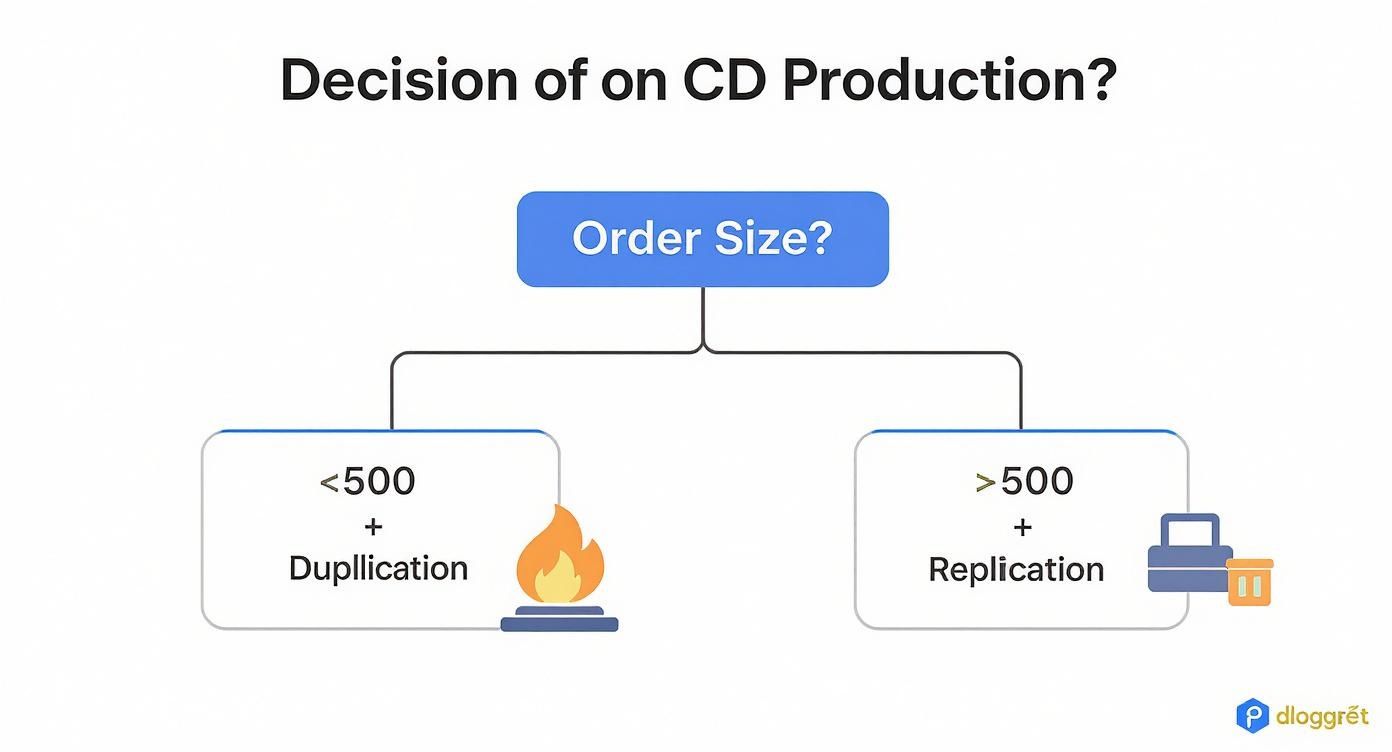
As you can see, the main deciding factor between duplication and replication really just boils down to how many discs you need. While the global disc duplication market is still a major player, valued at around $500 million, picking the right method is what separates the pros from the rookies—whether you’re an indie artist or a major label. You can find more insights about the physical media market on Data Intsights Market.
CD Duplication vs Replication At a Glance
Feeling a bit overwhelmed? No worries. This table breaks it all down so you can quickly see which option fits your project best.
| Feature | CD Duplication (Burning) | CD Replication (Pressing) |
|---|---|---|
| Best For | Small runs (under 500) | Large runs (500+) |
| Turnaround | Super fast (24-48 hours) | Longer (7-10 business days) |
| Process | Burning data with a laser | Stamping data from a glass master |
| Cost Per Disc | Higher for small runs | Very low for large runs |
| Disc Type | CD-R (Recordable) | CD-ROM (Read-Only Memory) |
| Print Quality | Inkjet or thermal printing | Professional offset or silkscreen |
| Ideal Use | Demos, mixtapes, quick promo | Retail albums, software, major releases |
At the end of the day, duplication gets you quality discs fast for smaller batches, while replication offers that top-tier, retail look and the best price for big orders.
When to Choose CD Duplication for Your Project
Knowing the difference between duplication and replication is one thing. Knowing when to pull the trigger on duplication? That’s where the real strategy comes in.
CD duplication isn’t just a “smaller” option; it’s a powerful tool for specific moments when speed and flexibility are what you need most. Think of it as the agile solution for projects that need to happen now, not next month. It’s your on-demand resource for a tight deadline, a small run, or when you want to test the waters before diving into a massive order.
Speed Is Your Greatest Advantage
The biggest reason to go with CD duplication is its insane turnaround time. Because the process skips the whole complex setup of creating a glass master, duplicated discs can be in your hands in just a few days—sometimes even within 24 to 48 hours.
That kind of speed is a total game-changer. Imagine your band lands a last-minute opening slot for a huge show this Friday, but you’re completely out of merch. With duplication, you can order 150 CDs on a Tuesday and have them ready to sell at the show. Replication, with its typical 7-10 day timeline, wouldn’t even be an option.
This makes duplication perfect for:
- Last-minute merch for shows or tours.
- Promo discs for a conference you forgot was next week.
- Urgent demos you need to get in the mail to labels ASAP.
Flexibility for Small and Test Batches
Another huge plus is the low minimum order. Most professional services, like us here at Mixtape Duplication, let you order as few as 25 or 50 discs.
This opens up a ton of possibilities for projects that don’t need a giant inventory. It makes professional cd production duplication accessible for everyone.
This flexibility is ideal for:
- Testing a new demo: A band can get 50 CDs to share with a focus group for feedback before finalizing the album.
- Limited edition releases: You could create a special run of 100 EPs with unique artwork just for your biggest fans.
- Corporate materials: A startup can create 200 professional-looking promo discs for a single event without getting stuck with hundreds of outdated copies later.
Being able to order small batches without a massive upfront cost takes away so much of the financial risk. It lets you be strategic, producing only what you need, right when you need it.
Busting the Quality Myth
There’s a common myth that duplication is somehow “lower quality” than replication. For most uses, that’s just not true.
Professional duplication services use high-grade CD-R discs and advanced burning towers to make sure you get a clean, error-free copy with great audio fidelity. A professionally duplicated CD-R will play perfectly in the vast majority of modern CD players, computers, and car stereos.
Sure, a replicated disc (a CD-ROM) is physically pressed, which might give it an edge with really old or picky players. But for demos, mixtapes, and small-run albums, the audio quality is practically identical to the listener’s ear.
Choosing duplication doesn’t mean you’re cheaping out on sound. It means you’re making a smart call to prioritize speed and cost-effectiveness for a short run. For anyone needing fewer than 500 discs on a tight schedule, duplication isn’t just an option—it’s the best move you can make.
Why Replication Is the Gold Standard for Major Releases
 When your project grows from a small batch of a few hundred discs to a run of several thousand, the game changes completely. Simple cd production duplication no longer cuts it. This is where CD replication comes in, shifting from burning discs one by one to a full-blown manufacturing process. It’s the undisputed industry standard for any serious, large-scale release, and for good reason.
Think of it like this: duplication is your trusty desktop printer, perfect for running off a handful of flyers. Replication, on the other hand, is the industrial printing press—the heavy machinery you bring in to print a magazine run. It’s built for volume, quality, and cost-efficiency at scale.
The Glass Master: A Blueprint for Perfection
Unlike duplication, which just burns your data onto a blank CD-R, replication creates each disc from scratch. The whole process kicks off with something called a glass master. This is an optically perfect glass disc where your music or data is etched with a high-precision laser. It’s the flawless, definitive original of your project.
From that fragile glass master, a tough metal “stamper” is made through an electroplating process. This stamper is the negative image of the master—it has tiny bumps where the master had pits. This is the tool that gets loaded into a massive injection-molding machine, ready to press out thousands of perfect clones.
Yes, this setup process is more involved and has a higher upfront cost, which is why it doesn’t make sense for tiny orders. But once that stamper is created, the price per disc drops dramatically. This makes replication the most economical way to go for any order over 500 units. It guarantees that the 10,000th disc off the line is an identical, bit-for-bit copy of the first.
Unbeatable Durability and Quality
You can feel the difference between a duplicated CD-R and a replicated CD. A CD-R uses a layer of dye that a laser burns to hold data. A replicated disc has the data physically stamped right into its polycarbonate plastic base.
This isn’t just a technical detail; it creates huge advantages:
- Superior Durability: Replicated discs laugh at things like sunlight and heat, which can cause the dye in a CD-R to break down over time. This makes them the go-to for archival purposes and long-term storage.
- Flawless Retail Finish: Replication allows for professional printing methods like silkscreen or offset printing directly onto the disc. The result is sharper text, richer colors, and that polished, “store-bought” look and feel.
- Universal Compatibility: Replicated discs (CD-ROMs) are manufactured to the original Red Book audio standard. That means they have the highest possible level of compatibility and will play perfectly in almost any CD player out there—from old car stereos to brand-new Hi-Fi systems.
Replication isn’t just about making a lot of discs. It’s about creating a professional, durable product that works everywhere. It’s a statement that tells your fans and customers you’ve invested in a top-tier release.
The demand for this kind of reliability is clear. The optical media market, including both duplication and replication, was projected to grow from USD 2.5 billion to USD 4.6 billion, driven by the ongoing need for dependable physical media. You can read more about the growth of the optical media market at Future Market Insights. This proves that for any serious distribution, physical quality still matters. For an established artist dropping an album or a software company shipping its product, replication is the only way to go.
Choosing Your Artwork and Packaging Options
Once your audio is locked in and you’ve picked between duplication and replication, it’s time for the fun part: deciding how to package your masterpiece. Your packaging is so much more than just a protective shell; it’s the very first thing a fan touches and sees. It sets the whole vibe for your project.
Think of it like the cover of a book. A bland, generic cover gets skipped over, but a killer one pulls people in. Your CD packaging does the exact same thing. It turns your audio into a complete, professional product that feels as good as it sounds.
The Classic Jewel Case
When you picture a classic CD from the 90s, you’re probably thinking of the Jewel Case. It’s been the industry standard for a reason. This rigid, clear plastic case offers top-notch protection for the disc inside.
Jewel cases are super versatile. You can slip in anything from a simple two-panel cover to a full-blown booklet with lyrics, photos, and thank yous. This makes them perfect for full-length albums where you want to give listeners a deeper dive. They might be a bit bulkier than other options, but their professional look is hard to beat.
The Sleek And Simple Jacket Or Sleeve
If you’re on a tight budget or need something easy to carry, the CD Jacket (often called a sleeve or wallet) is a brilliant choice. It’s a simple, lightweight pocket made from sturdy cardstock that the disc slides right into. They’re way more affordable and won’t crack like jewel cases can.
Their slim design makes them ideal for:
- Promotional giveaways at shows or events.
- Demos you’re sending out to labels or radio stations.
- Singles or EPs sold at a merch table where space is precious.
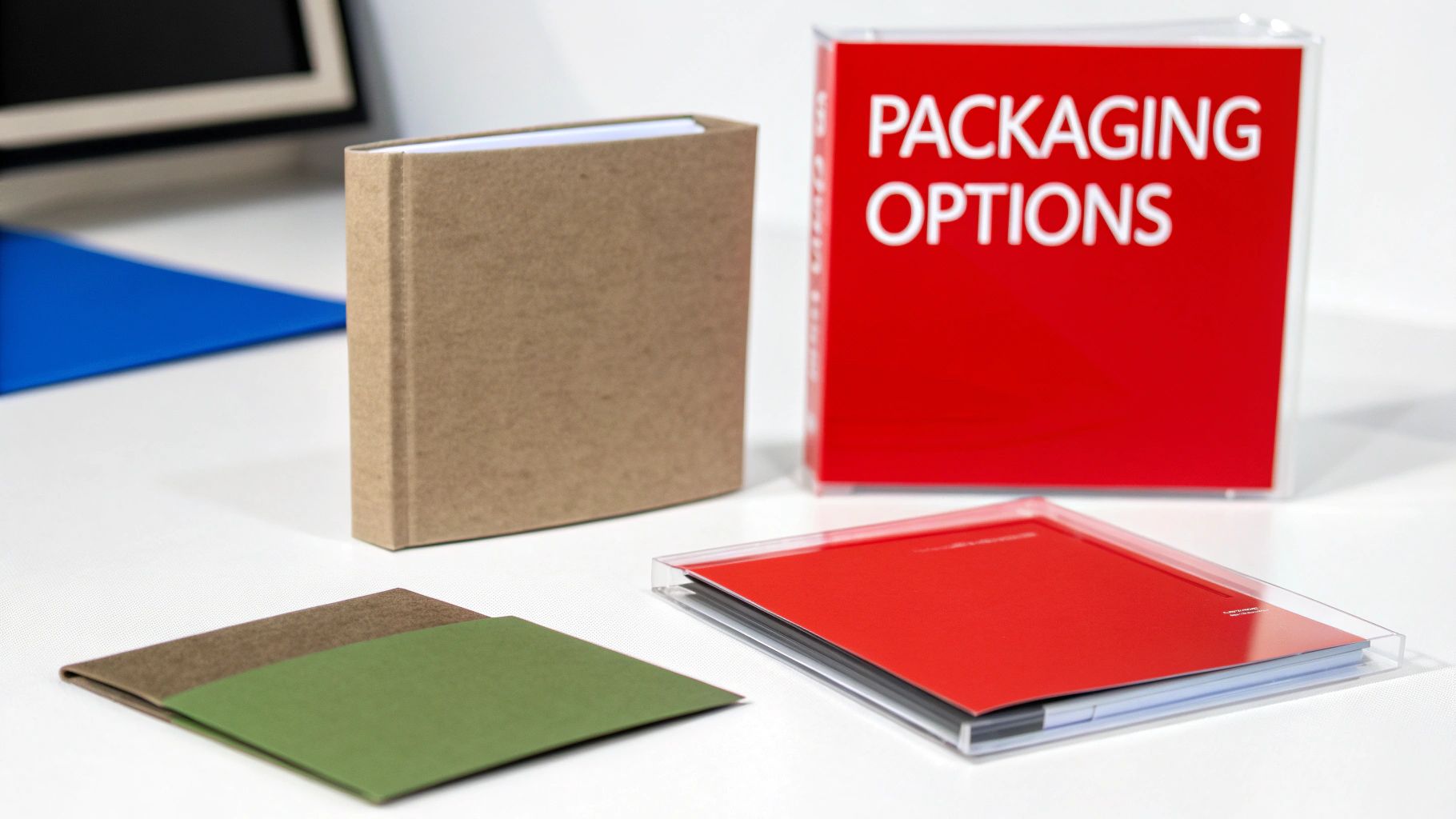
Jackets give you a great canvas for full-color printing on the front and back, making your artwork pop. Plus, they’re a more eco-friendly option. A whole box of jackets is much lighter and easier to haul around than the same number of jewel cases, as you can see in these examples of compact packaging solutions.

The Premium DigiPak
Want the best of both worlds? The DigiPak is your premium ticket. It combines a cardstock shell, like a jacket, with a clear plastic tray glued inside to hold the disc securely, just like a jewel case. This hybrid design gives you the sturdiness of plastic with the high-end feel of a printed wallet.
A DigiPak immediately feels like a high-value product. It has a satisfying, book-like quality that tells your fans this release is something special.
This is the go-to for major album releases or special editions where you want to leave a lasting impression. They can be designed with multiple panels that fold out, creating a cool, interactive unboxing experience for your biggest supporters.
Deciding on the right case can feel overwhelming, so let’s break down the most common choices to see what fits your project best. Each one has its own strengths, depending on your budget, goals, and the story you want to tell.
Comparing Common CD Packaging Options
| Packaging Type | Best For | Pros | Cons |
|---|---|---|---|
| Jewel Case | Full-length albums, retail releases | Excellent protection, space for booklets, professional look | Bulky, plastic can crack, higher cost |
| Jacket/Sleeve | Promos, singles, demos, budget projects | Affordable, lightweight, eco-friendly, great for mailers | Less protection, no spine for shelving |
| DigiPak | Special editions, major album releases | Premium feel, highly customizable, durable | Higher price point, more complex design setup |
Ultimately, the best packaging is the one that reflects the quality of your music and connects with your audience. Whether you go for the classic jewel case or the modern DigiPak, making a thoughtful choice shows you care about the entire fan experience.
Critical Design and Finish Considerations
No matter which option you choose, your artwork files have to be on point. Nothing screams “amateur” faster than a blurry, low-resolution cover.
To make sure your final product looks sharp and professional, always stick to these rules:
- Use the Manufacturer’s Templates: Every duplicator provides exact templates for a reason. Use them! This guarantees your design fits perfectly and prevents important parts from getting cut off during printing.
- Submit High-Resolution Artwork: Your images and final files need to be at least 300 DPI (dots per inch). This is the professional printing standard and ensures everything looks crisp and clear.
- Choose the Right Finish: The finish on your packaging subtly changes how people see it. A gloss finish makes colors vibrant and gives a modern sheen, while a matte finish offers a more subdued, artistic, and sophisticated vibe.
By thinking through your packaging and prepping your artwork the right way, you’ll end up with a physical CD that looks just as incredible as your music sounds.
A Step-by-Step Guide to Placing Your Order
 Jumping into cd production duplication can feel like a huge step, but don’t worry—placing your order is easier than you think. With a solid plan, you can breeze through the process and sidestep the common mistakes that cause delays. This guide breaks it all down into a simple checklist.
Nailing these steps means all your materials are perfectly prepped. That translates to a faster turnaround and a final product that looks and sounds exactly the way you imagined it. Let’s walk through it from start to finish.
Prepare and Finalize Your Master Audio
Before you even think about the cover art, your audio needs to be flawless. This is the heart of your project, and once you send it off, there are no do-overs. A final, focused listen-through isn’t just a good idea; it’s essential.
Listen on different setups—in the car, with headphones, through studio monitors. You’ll be surprised what you might catch. Once you’re confident it’s perfect, export your master files in the right format.
- For Duplication: The standard is high-resolution WAV files (16-bit, 44.1 kHz). Make sure every file is clearly labeled and in the correct order (e.g., 01_Track_Name.wav, 02_Another_Track.wav).
- For Replication: The industry standard is a DDP (Disc Description Protocol) image. This is a specific folder containing all your audio data and metadata, guaranteeing a perfect, error-free transfer to the glass master.
This is your last chance to get the audio right. Double-checking now saves you from the nightmare of pressing hundreds of CDs with a mistake you can’t fix.
Design Your Artwork Using Official Templates
Your artwork is the first thing people will see. To make sure it prints perfectly, you absolutely must use the design templates provided by your duplication service. These files are measured precisely for your chosen packaging, whether it’s a jewel case, jacket, or DigiPak.
Ignoring templates is one of the biggest reasons for production delays. Designs made without them almost always have the wrong dimensions, which means critical text or images get chopped off.
Pro Tip: Always design in CMYK color mode, not RGB. CMYK is the standard for professional printing, and using it from the start ensures the colors on your final CD match what you see on your screen. Also, make sure all your images are at least 300 DPI for a sharp, pro-quality finish.
Assemble Your Order and Submit Your Assets
With your master audio locked in and your artwork ready to go, it’s time to place the order. This is where all the pieces come together and you officially kick off production.
Here’s a quick checklist to run through as you finalize everything:
- Choose Quantity: Decide if you need duplication (for runs under 500 units) or replication (for 500 or more).
- Select Packaging: Pick the Jewel Case, Jacket, DigiPak, or other option that fits your project’s vibe and budget. You can check out all kinds of packaging styles including CD cover boxes to find the perfect home for your CD.
- Upload Your Files: Carefully upload your master audio (WAVs or DDP) and your final artwork PDFs to the company’s portal.
- Review and Approve Proofs: You’ll get digital proofs of your artwork. Check them obsessively. Look for typos, wrong track listings, or blurry images. This is your last, last chance to catch a mistake before it goes to print.

Once you hit “approve” on those proofs, your work is done! The project moves into the production queue, and you’ll get a timeline for completion and shipping. Then, all that’s left is to wait for that exciting delivery of your finished CDs.
Understanding the Costs of CD Production
So, you’re ready to press your project onto a CD, but what’s it actually going to cost? Thinking about a budget for your cd production duplication order is a lot like building a custom package—there isn’t one flat price. The final number is a mix of several key choices you’ll make along the way.
The biggest decision you’ll face, and the one that moves the needle the most on price, is quantity. This is where you see the huge financial difference between duplication and replication kick in. Duplication keeps a steady price per disc, which is great for small batches. But with replication, the more you order, the cheaper each disc becomes. Ordering 1,000 replicated CDs can drop your per-disc cost to just a fraction of what a short run of 100 duplicated discs would be.
Key Factors That Shape Your Final Price
Beyond just the number of discs, a few other things will directly impact your total cost. Each option you choose adds another layer of quality and professionalism, which naturally adjusts the final price tag.
Here’s what you need to keep an eye on:
- Packaging Type: This is a big one. A simple, economical cardboard jacket will cost a whole lot less than a premium, multi-panel DigiPak with a glossy finish.
- Printing Complexity: A basic black-and-white print on the disc itself is your most budget-friendly choice. On the other hand, full-color, high-resolution printing on both the disc and the packaging will cost more.
- Add-On Services: Little extras can add up. Think professional shrink-wrapping for a retail-ready look, adding a unique barcode for sales, or inserting a multi-page booklet. You can check out a bunch of bulk CD packaging options here to get an idea of the possibilities.

A Look at the Broader Industry
It’s pretty interesting to see the market behind all this. The global industry for the specialized machinery that duplicates CDs, DVDs, and Blu-rays was valued at around USD 150 million. That number is expected to grow, which shows there’s still a solid demand for physical media. For anyone curious, you can find more insights on the duplicating equipment market at Intel Market Research.
Knowing these cost factors gives you the power to make smart trade-offs. You can decide where to spend your money for the biggest impact—maybe you splurge on a slick DigiPak but keep the on-disc print simple. It’s all about creating a professional product that fits your vision and your budget.
CD Production: Your Questions Answered
Even with the best plan, you’re bound to have a few questions when it comes to cd production duplication. We get it. This section cuts straight to the chase, giving you clear answers to the most common things we’re asked about.
Think of this as your quick-reference guide. From production speeds to file types, here’s what you need to know to keep your project moving smoothly.
How Long Will My CD Order Take?
This is easily the number one question we hear, and the answer comes down to which production method you choose.
- Duplication: If you need CDs fast, this is your answer. Duplication orders are typically finished and ready to ship in just 2-5 business days. It’s the perfect solution for getting last-minute merch ready for a show.
- Replication: Because this process involves creating a glass master and a stamper from scratch, it naturally takes a bit longer. You can expect a turnaround time of about 7-10 business days for most replication jobs.
A quick tip: always approve your digital proofs as soon as you can. Any delay there will hold up the production timeline.
Don’t forget, these timelines are for production only. Always factor in an extra few days for shipping to get the finished CDs from our place to yours.
Can I Order a Very Small Quantity of CDs?
You absolutely can. This is one of the biggest advantages of duplication. Most professional services have incredibly low minimums, making it easy to get started no matter your budget or needs. You can usually order as few as 25 or 50 discs, which is perfect for testing out a demo, creating a limited edition release, or even making a few personalized gifts.
What Audio File Format Should I Submit?
Using the right file format is critical for getting the best possible sound quality on your finished CDs.
For duplication, the standard is uncompressed WAV files at 16-bit, 44.1 kHz. This format keeps all the original audio data intact, so your master recording sounds exactly as it should.
For replication, the professional industry standard is a DDP (Disc Description Protocol) file. This isn’t just a single file, but a whole folder containing all your audio and metadata, perfectly organized. Submitting a DDP guarantees a flawless, error-free transfer to the glass master and makes sure there are no mix-ups with your track order.
Ready to bring your mixtape to life with professional quality and packaging? At Mixtape Duplication, we make it simple to create the perfect custom CD for any occasion.
About the Author: CDinser
