
How To Make Custom CD’s
How to Make a Professional Custom CD
Making a custom CD is more than just burning a few songs. It’s about creating something real and
tangible you can share, a standout piece of personal art in an age of temporary digital playlists. It’s a
physical item someone can hold, gift, and truly treasure.
Why Make a Custom CD Today
In a world filled with fleeting digital streams, the act of putting together a custom disc just hits differently.
It’s a deliberate, thoughtful process that turns a simple playlist into a memorable keepsake. The appeal isn’t
just nostalgia, either—it’s about making an impact and delivering quality.
For anyone who really cares about audio, the difference is night and day. A CD made from high-quality
WAV or FLAC files gives you uncompressed, superior sound that most streaming services can’t touch.
That commitment to audio fidelity is a huge reason physical media is still kicking.
More Than Just Music
Beyond the sound, a custom CD fills a personal need that a shared Spotify link just can’t. Think of it as a
physical expression of care, perfect for those moments that matter.
- Unforgettable Gifts: A handpicked mix for a wedding, anniversary, or a big birthday becomes a
- cherished memento. It’s a time capsule you can actually hold.
- Essential Tools for Artists: If you’re in a band, a professionally printed CD is your best friend.
- It’s a physical demo to hand to venue owners, producers, or to sell at the merch table after a great set.
- Preserving Memories: Imagine compiling audio from family events, old voicemails, or treasured
- recordings onto a disc. It creates a lasting archive that’s super easy to share with loved ones.
The desire for something real and lasting is stronger than ever. A custom CD isn’t just a product;
it’s a personal statement, a carefully crafted experience designed to be held and valued.
This tangible connection is exactly why the format refuses to die. Even with digital media everywhere,
the global Compact Disc market was valued at USD 1.5 billion in 2023 and is expected to keep growing.
This surprising resilience is fueled by collectors, artists, and people like you who get the unique value
of a physical medium. You can discover more insights about the CD market’s surprising longevity right here.
Curating Your Perfect Playlist
The heart and soul of any great custom cd is the playlist. This isn’t just a random list of songs; a truly
memorable mix tells a story, sets a specific mood, and takes the listener on a journey. Before you even think
about dragging files over, ask yourself: what’s this mix for? Is it the soundtrack for a cross-country road trip,
or is it for a quiet night in with a glass of wine? Your answer will shape every single choice you make.
Start by jotting down all the songs that fit the vibe, but don’t stop there. Think about the flow. One of the best
tricks I’ve learned over the years is arranging tracks by their key and tempo to create a smoother listening
experience. You can create a really powerful emotional arc by, say, starting with a slower, more thoughtful song
and gradually building the energy to a massive, sing-along anthem.
File Quality Makes a Difference
You can put together the world’s greatest playlist, but if you use low-quality audio files, it’s all for nothing.
That rich, professional sound you’re after comes down to the file format. We all use compressed files like
MP3s for convenience, but they achieve their small size by literally throwing away audio data. For a custom
CD, you want to use lossless formats.
- WAV: This is the undisputed king for CD audio. It’s an uncompressed format, meaning it retains
- 100% of the original audio information from the master recording. No compromises.
- FLAC: This is a fantastic runner-up. FLAC files are compressed to save a bit of space, but they do it in
- a “lossless” way, so no audio quality is sacrificed. It’s the perfect middle ground between pristine quality
- and a more manageable file size.
Choosing the right audio format is crucial for getting the best sound out of your custom CD. Let’s break down
how the most common file types stack up.
Audio File Quality Comparison
| File Format | Audio Quality | Best Use Case |
|---|---|---|
| WAV | Lossless (Uncompressed) | The absolute best for CD burning; identical to the original studio master. |
| FLAC | Lossless (Compressed) | Excellent for CD burning when you need to save a little space without losing any quality. |
| MP3 | Lossy (Compressed) | Good for casual listening on a phone, but not ideal for a high-fidelity CD. |
As you can see, WAV and FLAC are your best bets for a project like this. They deliver the full, rich sound you expect from a physical CD.
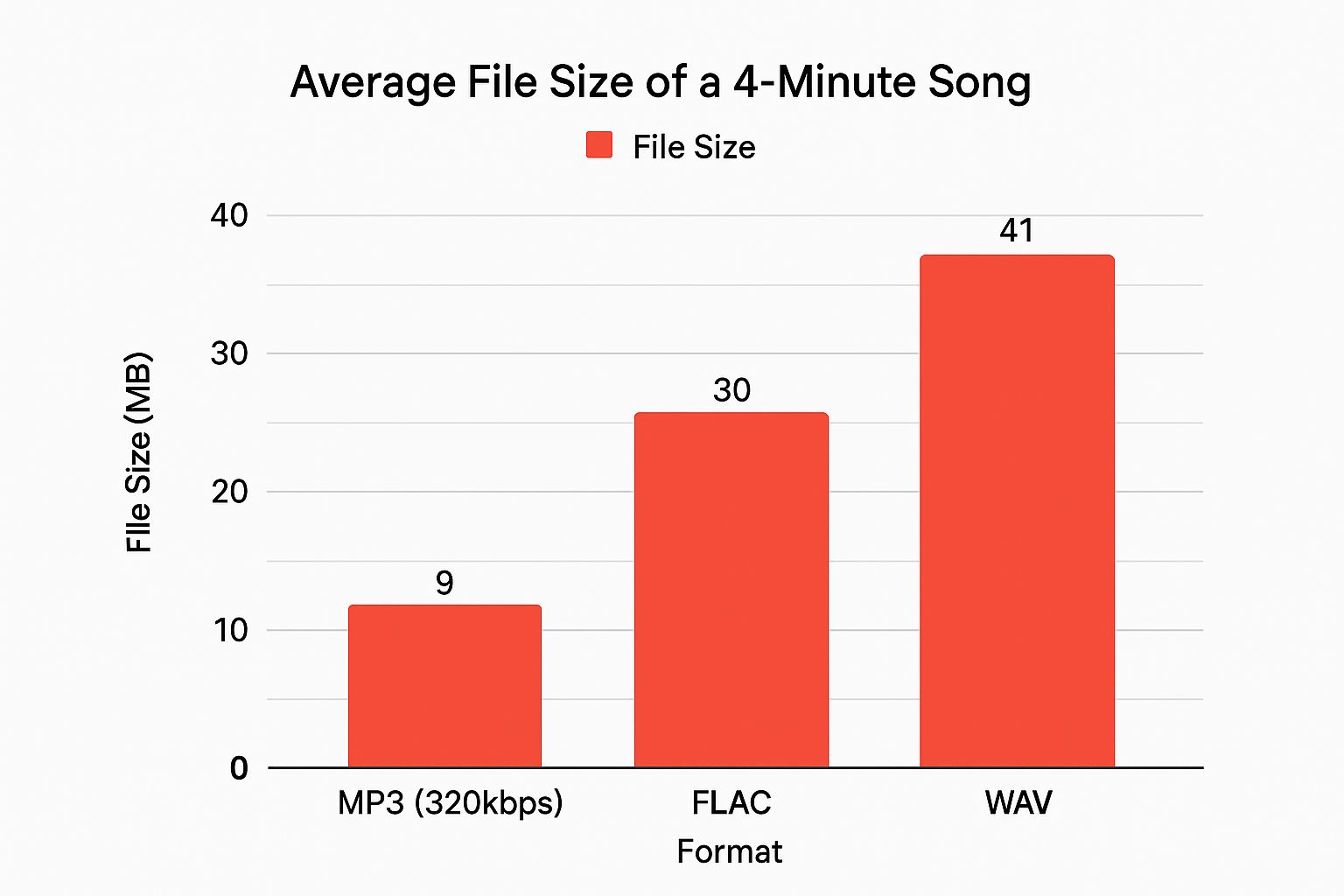
The trade-off for that superior quality is, of course, a larger file size. But trust me, it’s a difference you can
absolutely hear, and it’s well worth it for the final product.
Remember the golden rule of CD capacity: keep your total runtime under 80 minutes. This ensures
every track fits perfectly and plays back flawlessly on any device.
Once you have your tracks, listen to the whole thing from start to finish. Does the energy dip unexpectedly?
Does one song clash with the next? Sometimes, just swapping two tracks can completely change the feel of
the mix, turning it from something good into something truly unforgettable.
Designing Your CD Artwork
Your custom CD is more than just a playlist; it’s a whole vibe. The artwork is the first thing anyone sees,
and it’s your chance to create a visual identity that screams what the music is all about. This is how you
turn a simple disc into something that looks and feels like a professional keepsake. The goal? Make it look as good as it sounds.
Forget about winging it with generic templates or guessing sizes. To get that polished, fits-like-a-glove
final product, precision is everything. For a standard jewel case, you’re working with a few key pieces,
and getting the dimensions right from the start means no awkward cropping or stretched-out images later.
Key Artwork Dimensions
To get a truly professional result, your design files need to be spot-on with the printer’s specs. You’ll also
want to include a “bleed”—a little extra image area around the edges—to make sure you don’t end up with
weird white borders after everything is trimmed.
Here are the numbers you need to know:
- Disc Face: The printable area is a circle with a 120mm outer diameter. The hole in the middle
- has a 22mm inner diameter.
- Jewel Case Insert (Front Booklet): This is your classic 120mm x 120mm square. If you’re
- planning a multi-page booklet, each panel will stick to these dimensions.
- Tray Card (Back Insert): This one’s a bit more complex. The full piece is a 150mm x 118mm
- rectangle. This includes two 6mm spines that fold up on the sides, leaving the main back panel at
- 138mm wide.
Pro Tip: Always, always design your artwork in high resolution. We’re talking 300 DPI (dots per inch).
This is the secret to making sure your images and text look crisp and clear in print, not pixelated or blurry.
Crafting a Compelling Design
You don’t need to be a graphic design wizard to create incredible artwork. Free tools like Canva are super
powerful and make it easy to bring your vision to life. A great place to start is with a high-resolution photo
that captures the mood of your mix. Maybe it’s a landscape from a memorable road trip or an abstract image
that just feels right.
Next up, think about your text. Pick one or two fonts that are easy on the eyes and match your overall theme.
A clean, simple font for the tracklist often pairs really well with a more expressive font for the title.
Finally, pull it all together with a consistent color scheme. A simple trick is to pull colors directly from your
main image to use for your text and any background elements. This simple move creates a design that feels
cohesive and intentional, making your custom cd a true work of art.
For a complete visual breakdown, check out our guide to CD cover and insert dimensions to help you

visualize exactly how it all fits together.
How to Order Your Custom CD
Alright, you’ve put in the work. Your killer playlist is set, the artwork looks incredible, and now
you’re at the most exciting part: bringing it all to life.
Ordering your custom CD is pretty straightforward, but a few key details make all the difference
between a good final product and a flawless one. This is where your digital files finally become
something real you can hold in your hands.
First things first, you’ll need to upload your master files. This usually means two separate uploads:
one for your audio tracks and another for your artwork. For the best sound, always upload your audio
as high-quality WAV files. This preserves that rich, uncompressed sound you worked so hard to get right.
Choosing Your Packaging
Next up is picking the right home for your CD. This choice really shapes the final look and feel of your
project, so it’s worth thinking about the vibe you’re going for.
- Standard Jewel Case: The classic. It’s that durable plastic case with a clear front and a tray card
- that everyone recognizes. It’s the industry standard for a reason and gives your project a super professional look.
- Slimline Case: A thinner, more lightweight version of the jewel case. This is a great move if you’re
- trying to save on space or shipping costs, especially if you’re making CDs for a promotional giveaway.
- Cardboard Sleeve or Jacket: An awesome eco-friendly and stylish option. It feels modern and
- minimalist, perfect for EPs, singles, or mixtapes with more of an indie feel.
Each option tells a different story. For artists or businesses doing a larger run, we also have bulk CD
duplication options without individual cases to help keep costs down. You can see how we package our bulk CD orders here.

Finalizing and Proofing Your Order
Once your files are uploaded and you’ve picked your packaging, you’ll get a digital proof. Treat this as
your last chance to catch any mistakes. Go over it with a fine-tooth comb—check for typos in the
tracklist, make sure the artwork resolution is sharp, and double-check that the design on the disc face is perfectly centered. A few extra minutes here can save you from a major headache later.
Always double-check your audio file sequence before submitting. The order you upload them in is typically
the order they will be burned onto the final custom CD.
The demand for personalized physical media isn’t going anywhere. It’s a powerful tool for artists,
a unique gift, and a smart marketing move for businesses. In fact, the global market for custom CDs is projected to hit $2.8 billion by 2027.
After you approve the proof and lock in your details, your job is done. Now it’s our turn to get to work.
What Happens After You Place Your Order
So, you’ve clicked “submit.” What happens next? The moment your order hits our system, our
production team jumps into action.
First thing’s first: we do a quality check on your uploaded audio and artwork files. We’re looking
to make sure everything meets the proper standards for printing and duplication so your final
product looks and sounds fantastic. Once your files get the green light, your project officially
enters the queue for disc pressing and on-disc printing.
The whole process, from the time you order to the moment your package ships, typically takes
about 3-5 business days. That window gives us the time we need for printing, carefully
assembling the CDs into your chosen cases, and getting them all boxed up for shipping.
Even though physical media might seem a bit old-school, there’s still a real demand for it,
especially for unique projects. Believe it or not, the CD market is projected to grow at a steady
3.48% through 2033, fueled by people making a custom cd for their brand, a personal gift,
or a special event. You can learn more about these compact disc market findings right here.
Your Final Quality Check
When that box arrives at your door, take a minute to give everything a once-over. This is your
final chance to make sure it’s all perfect.
Here’s what to look for:
- Check the Print: Look closely at the jewel case insert and the face of the disc. Are the colors
- vibrant and true to your design? Is all the text sharp and clear?
- Test the Disc: Pop one of the CDs into a player. Listen through to make sure the tracks are in
- the right order and play smoothly without any skips or glitches.
This quick inspection confirms that what you created online is exactly what you’re holding in your hands.
We take a lot of care in our process, like carefully boxing the inserts and other materials to ensure

everything arrives looking pristine.
Your Custom CD Questions Answered
Diving into the world of custom CDs for the first time? It’s totally normal to have a few questions.
We get these all the time, so we’ve put together some quick, straightforward answers to help you out.
The big one we always hear is about how many songs you can fit. A standard CD holds 80 minutes of audio,
but we strongly recommend capping your playlist at 21 songs. Why the limit? It’s all about compatibility.
Packing a CD to the absolute brim can cause playback issues on older players, and the last thing you want
is for your perfect mix to skip.
What If I Don’t Own the Music?
This is a crucial point. It’s up to you to make sure you have the rights to use the music you send us. If you’re
making a personal gift—like a mix for a friend’s birthday or wedding favors—you’re generally in the clear.
But if you plan to sell these CDs, you absolutely must get the proper licenses from the artists or their labels.
Think of it this way: you’re crafting a personal mixtape, not producing a commercial album. Our
service is designed for creating one-of-a-kind gifts and personal projects.
Can You Find the Songs for Me?
Yep, that’s our specialty! You don’t have to stress about tracking down high-quality audio files. Just send
us a link to your playlist on Spotify, Apple Music, or YouTube, or even just a typed-out list. We’ll handle the
rest, making sure every song is sourced at the highest possible quality for amazing sound on your custom CD.
Here are a few other common questions we get:
- How long does it take? Most orders are out the door and on their way to you within 3-5 business days.
- What about artwork? For the sharpest look, send your artwork files as a JPG or PNG at 300 DPI.
- Where do you ship from? We’re based in Atlanta, GA, and we ship all over the country.
678-780-1722
cdinserts@gmail.com
About the Author: CDinser
